Your next VMware decision
Make your next VMware decision with confidence.
Rising costs, renewal deadlines, and migration risks can make the next step feel overwhelming. Our advisors help you understand your options and choose a path that fits your infrastructure, team, and budget.
- A clearer shortlist. Options worth evaluating, including staying on VMware.
- The key tradeoffs. Cost, migration effort, and operational risk.
- Practical next steps. What to verify before a renewal or migration.
30-minute conversation. Free advisory guidance. No obligation to move forward. See an example review.
Explore a rough cost estimate first
Adjust your VM count and storage for a directional annual range across eight paths. This is a planning estimate, not a provider quote.
Total usable storage for your VMs, before replication or backup copies. 1 TB = 1,000 GB. Default: 20 TB for 100 VMs; adjust to your actual environment.
Estimated annual cost across 8 paths
Request a written options review
Prefer to start by email? Request a written shortlist with the main tradeoffs and next steps. An advisor will reply within one business day and confirm any details needed for your review. A meeting is optional.
We couldn't save your request. Please try again.
Request received. An advisor will reply within one business day with next steps for your written review. A meeting is optional. You can also talk through your options.
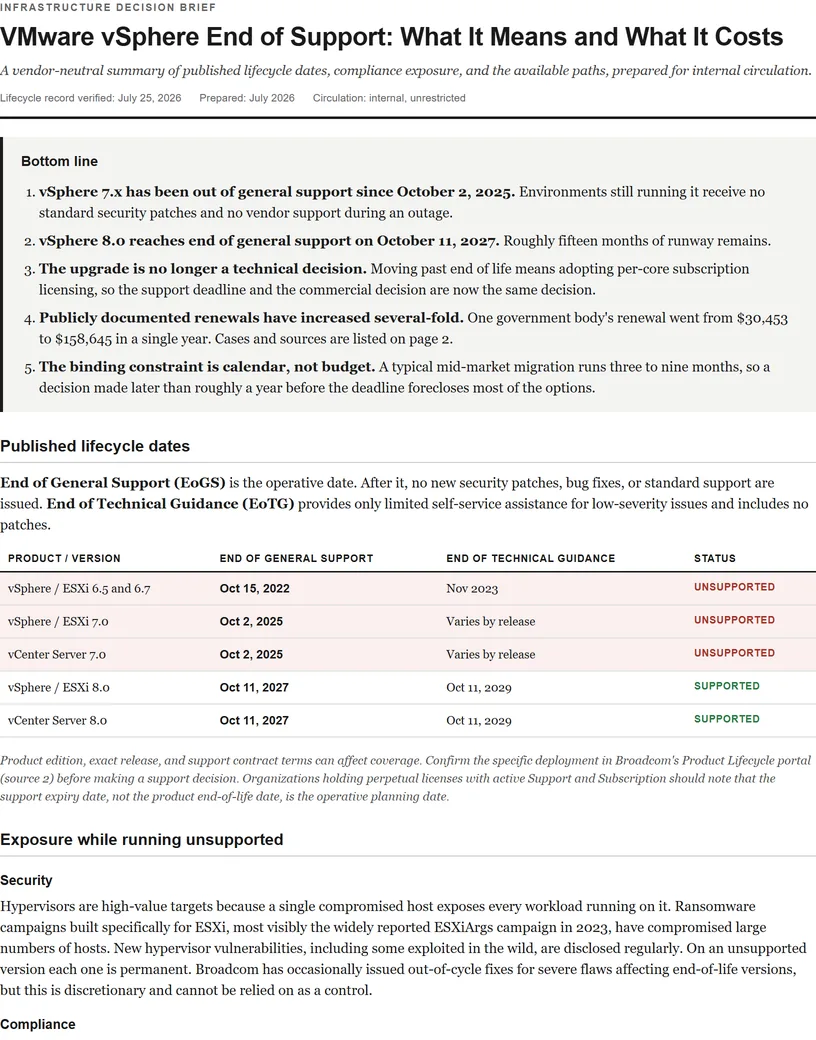
End of life used to be a routine upgrade conversation. Under Broadcom, it's a forcing function: upgrading past EOL means moving onto a per-core subscription, so the EOL date on your version is effectively the deadline for your whole platform decision.
Lifecycle record last verified: July 25, 2026
vSphere 7.x: End of General Support was October 2, 2025. vSphere 8.0: Broadcom's published lifecycle information lists October 11, 2027.
Check the official vSphere 7 support notice and Broadcom Product Lifecycle portal for your exact product, edition, and release before making a support decision.
VMware support lifecycle dates
End of General Support (EoGS) is the date that matters: after it, no new security patches, bug fixes, or standard support. End of Technical Guidance (EoTG) adds only limited self-service help for low-severity issues, no patches.
| Product / Version | End of General Support | End of Technical Guidance | Status (July 2026) |
|---|---|---|---|
| vSphere / ESXi 5.5 | Sep 19, 2018 | Sep 19, 2020 | Unsupported |
| vSphere / ESXi 6.0 | Mar 12, 2020 | Mar 12, 2022 | Unsupported |
| vSphere / ESXi 6.5 & 6.7 | Oct 15, 2022 | Nov 2023 | Unsupported 3.5+ years |
| vSphere / ESXi 7.0 | Oct 2, 2025 | Apr 2, 2027 | Past EoGS, no standard patches |
| vCenter Server 7.0 | Oct 2, 2025 | Apr 2, 2027 | Past EoGS |
| vSphere / ESXi 8.0 | Oct 11, 2027 | Oct 11, 2029 | Supported, subject to exact release |
| vCenter Server 8.0 | Oct 11, 2027 | Oct 11, 2029 | Supported |
| VCF 9.x (current) | Per Broadcom lifecycle policy | - | Subscription required |
Running vSphere 8? The dedicated vSphere 8 end-of-life page covers the October 11, 2027 deadline in detail, including why individual 8.0 update releases can fall out of support years before that date.
Dates reflect Broadcom records checked July 25, 2026. Product, edition, release, and support contract details can affect coverage, so confirm your exact deployment in the official lifecycle portal.
What running unsupported actually exposes you to
Security exposure
ESXi is one of the most attacked pieces of infrastructure software on earth. Ransomware families purpose-built for ESXi (the "ESXiArgs" wave being the most famous) have encrypted thousands of environments, and new hypervisor CVEs, including in-the-wild exploited vulnerabilities, appear every year. On an unsupported version, every one of those becomes a permanent hole. Broadcom has occasionally issued out-of-cycle patches for catastrophic flaws on EOL versions, but that's a courtesy, not a policy you can build a risk posture on.
Compliance impact
- PCI DSS requires vendor-supported, patchable system components; unsupported hypervisors are a standard audit finding.
- HIPAA security-rule risk analyses must address unpatchable infrastructure hosting ePHI.
- CMMC / NIST 800-171 flaw-remediation controls are effectively impossible to satisfy without a patch source.
- Cyber insurance applications increasingly ask directly about end-of-life software; a breach traced to an unpatched EOL hypervisor is a claim-denial scenario.
Operational risk
- No vendor support during a severity-1 outage, your cluster, your problem.
- New hardware won't be certified for old ESXi; a failed host may be irreplaceable.
- Backup, monitoring, and security vendors progressively drop EOL-version compatibility.
The EOL trap: why "just upgrade" isn't simple anymore
Pre-Broadcom, the answer to EOL was a weekend upgrade cycle. Now upgrading from 7.x means adopting a VCF/VVF per-core subscription, the very price increase you may be trying to avoid (see how the new licensing works). That's why the EOL date and the renewal quote have collapsed into a single decision: pay Broadcom's new price, or use the deadline to move.
Your options at end of life
| Option | What it means | Best when |
|---|---|---|
| Upgrade + subscribe | Move to vSphere 8 / VCF 9 on per-core subscription direct with Broadcom | Deep VMware dependencies, budget absorbs the increase |
| Move to a managed VMware provider | Run current, supported VMware in a provider's cloud at VCSP scale pricing | You want vSphere without Broadcom's direct pricing, see providers |
| Migrate platforms | Replatform to Nutanix, Proxmox, Hyper-V, or OpenShift | Hardware refresh due anyway; long-term cost control is the goal, see comparisons |
| Third-party support (bridge) | Independent support firms keep lights on while you execute a plan | Buying 6–18 months of runway, not a destination |
| Do nothing | Run unsupported and accept the exposure | Honestly: almost never defensible past a short, planned window |
Recommended action by where you are
- On 6.5/6.7: You're years past safe. Treat this as an active incident-in-waiting; pick a destination and a timeline this quarter.
- On 7.0: Past EoGS as of October 2, 2025, with technical guidance ending April 2, 2027. Don't burn effort on an in-place upgrade to 8 unless you've already decided to stay and pay. Evaluate alternatives first because migration effort may be similar either way. Full detail in the vSphere 7 end of life guide.
- On 8.0: You have until October 2027, enough runway to do this right, not enough to defer it past your next budget cycle. A typical mid-market migration takes 3–9 months (cost guide).
- Perpetual with active SnS: Find your exact support expiry date today. That date, not the EOL date, is your real planning horizon.
What the renewal looks like when it lands
Public records show the scale. The Metropolitan Water District of Salt Lake & Sandy renewed at $30,453.04 in September 2024 and $158,644.72 in September 2025, roughly 5.2 times the prior amount. The U.S. Department of Energy reported a 400% increase for VMware supporting specified EHSS systems, and documented a plan to replace it with Hyper-V.
See the full table of publicly reported increases, with direct sources. Bundles, billable cores, support level, and contract terms differ in every one of these cases, so read them as a range of outcomes, not a benchmark for your quote.
Not ready for a pricing review? Take the brief.
Get the six-page VMware planning brief: lifecycle dates, the available paths, a planning timeline, and nine questions to resolve before renewal.
A question from the brief
What does at least one alternative path cost for the same environment, quoted concurrently rather than after the renewal is signed?
Bring the lifecycle dates, migration options, planning timeline, and nine renewal questions to your next team discussion.
We couldn’t complete your request. Please try again, or email advisor@vmwaremigrationhub.com.
Your brief is ready. Download it and share it with your team.
Download the brief (PDF)VMware end-of-life FAQ
When did vSphere 7 reach end of general support?
Broadcom lists October 2, 2025 as the End of General Support date for vSphere 7.x, including ESXi 7.x and vCenter Server 7.x. End of technical guidance is April 2, 2027. See the vSphere 7 end of life guide for what each date changes.
When does vSphere 8 reach end of general support?
Broadcom's published lifecycle information lists October 11, 2027 for vSphere 8.0, and vCenter Server 8.0 follows the same schedule. See the dedicated vSphere 8 end-of-life guide for the technical guidance date, the update-release detail, and your options.
Is it safe to run ESXi after end of general support?
Running unsupported ESXi increases security, compliance, hardware compatibility, and outage-recovery risk because standard security patches and vendor support are no longer available.
Is vSphere 6.5 end of life?
Yes. vSphere and ESXi 6.5 and 6.7 both reached end of general support on October 15, 2022 and technical guidance ended in November 2023. Both are fully unsupported and receive no security patches.
When did vSphere 6.0 reach end of life?
vSphere 6.0 reached end of general support on March 12, 2020 and end of technical guidance on March 12, 2022. vSphere 5.5 reached end of general support earlier, on September 19, 2018.
What is the difference between end of general support and end of technical guidance?
End of general support removes security patches, bug fixes, hardware and guest OS enablement, and standard support entitlement. End of technical guidance removes documentation-based self-help. Technical guidance includes no patches, so the gap between the dates is not extra safe running time.