Your next VMware decision
Make your next VMware decision with confidence.
Rising costs, renewal deadlines, and migration risks can make the next step feel overwhelming. Our advisors help you understand your options and choose a path that fits your infrastructure, team, and budget.
- A clearer shortlist. Options worth evaluating, including staying on VMware.
- The key tradeoffs. Cost, migration effort, and operational risk.
- Practical next steps. What to verify before a renewal or migration.
30-minute conversation. Free advisory guidance. No obligation to move forward. See an example review.
Explore a rough cost estimate first
Adjust your VM count and storage for a directional annual range across eight paths. This is a planning estimate, not a provider quote.
Total usable storage for your VMs, before replication or backup copies. 1 TB = 1,000 GB. Default: 20 TB for 100 VMs; adjust to your actual environment.
Estimated annual cost across 8 paths
Request a written options review
Prefer to start by email? Request a written shortlist with the main tradeoffs and next steps. An advisor will reply within one business day and confirm any details needed for your review. A meeting is optional.
We couldn't save your request. Please try again.
Request received. An advisor will reply within one business day with next steps for your written review. A meeting is optional. You can also talk through your options.
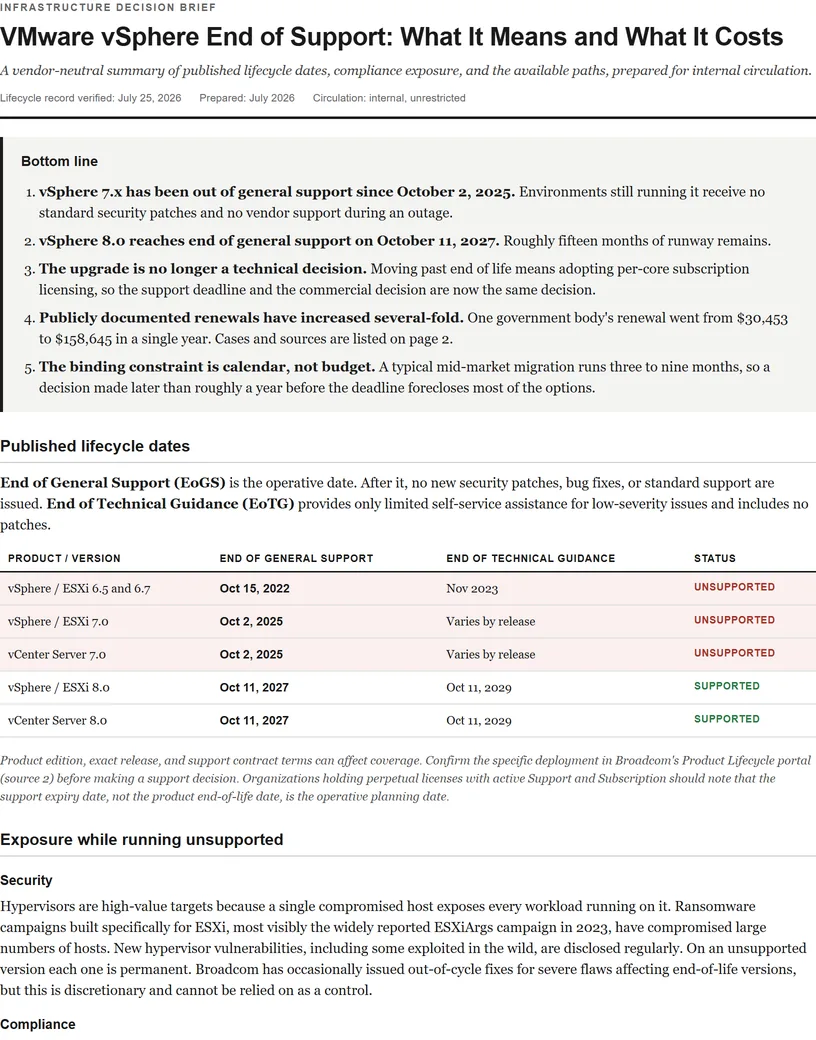
vSphere 8 lifecycle dates
| Component | End of General Support | End of Technical Guidance | Status today |
|---|---|---|---|
| ESXi 8.0 | Oct 11, 2027 | Oct 11, 2029 | Supported |
| vCenter Server 8.0 | Oct 11, 2027 | Oct 11, 2029 | Supported |
| vSphere 8 individual update releases | Vary by release | Vary by release | Check your exact build |
That last row is the one that catches people out, and it is covered in detail below.
What each date actually changes
| Milestone | What you lose | What you keep |
|---|---|---|
| End of general support Oct 11, 2027 | Security patches, bug fixes, new hardware and guest OS enablement, standard support entitlement | The software runs. Existing licences remain valid. |
| End of technical guidance Oct 11, 2029 | Access to documentation-based assistance and the self-help knowledge path | Nothing meaningful. This is the true end of the line. |
The gap between the two dates is frequently misread as two more years of safety. It is not. Technical guidance does not include patches, so from October 2027 onward every newly disclosed ESXi vulnerability is one you cannot remediate through the vendor. Given how ESXi vulnerabilities have been targeted by ransomware operators, that is the practical deadline, not 2029.
The update-release trap
Searches for terms like esxi 8.0.3 eol come up constantly, and for good reason: the October 2027 date applies to the vSphere 8 line, but individual update releases carry their own support windows. Running 8.0 does not automatically mean you are supported until 2027 if your specific build fell out of support earlier.
- Check the build, not the major version. Your entitlement follows the exact ESXi build number and vCenter release you are running.
- Update releases retire on their own schedule. Staying on an older 8.0 update can put you out of support years before the line-level date.
- vCenter and ESXi must be compatible. Upgrading one without the other is a common way to end up in an unsupported combination even when both are individually current.
What running past October 2027 exposes you to
- Unpatchable vulnerabilities. ESXi is a high-value ransomware target precisely because one host compromise reaches every VM on it. No patches means no remediation path.
- Compliance findings. PCI DSS, HIPAA, SOC 2, and most cyber-insurance questionnaires ask directly whether systems are vendor-supported. Unsupported infrastructure is a finding, not a footnote.
- Insurance exposure. Carriers increasingly ask about end-of-life systems at renewal, and a misrepresentation is a coverage problem at exactly the wrong moment.
- Hardware and guest OS drift. New server generations and new guest operating systems stop being certified, so your refresh cycle gets blocked by your hypervisor.
Your options, and the honest timing
October 2027 sounds distant. It is not, once you work backwards through procurement, a Broadcom renewal that probably lands first, and a migration that realistically runs three to nine months.
| Option | What it involves | Best when |
|---|---|---|
| Upgrade and subscribe | Move to VCF 9 on per-core subscription direct with Broadcom | Deep VMware dependencies and a budget that absorbs the increase |
| Managed VMware provider | Keep vSphere, run it in a VCSP provider's cloud at their scale pricing | You want VMware without Broadcom's direct pricing. See providers. |
| Migrate platforms | Replatform to Nutanix, Proxmox, Hyper-V, or OpenShift | Hardware refresh is due anyway and long-term cost control is the goal. See the comparisons. |
| Hyperscaler VMware service | AVS, GCVE, or VMware Cloud on AWS | Data-center exit on a deadline. Note these mostly keep you licensing VMware. See the GCVE migration guide. |
| Third-party support bridge | Independent support keeps the lights on while you execute | Buying 6 to 18 months of runway. Not a destination. |
Working backwards from the deadline
- Now. Inventory exact ESXi builds and vCenter versions. Identify anything already out of support at the update-release level.
- 12 to 18 months out. Price every option, including staying. This has to happen before your next Broadcom renewal, not after, or you negotiate with no alternative in hand.
- 9 to 12 months out. Decide and commit. Longer procurement cycles in regulated industries start here.
- 3 to 9 months out. Execute the migration or upgrade in waves.
- Before October 11, 2027. Be landed, with the old estate decommissioned.
The binding constraint for most organisations is not the 2027 date. It is the renewal that arrives first, which is where the leverage is either created or lost. See the renewal negotiation guide.
Not ready for a pricing review? Take the brief.
Get the six-page VMware planning brief: lifecycle dates, the available paths, a planning timeline, and nine questions to resolve before renewal.
A question from the brief
What does at least one alternative path cost for the same environment, quoted concurrently rather than after the renewal is signed?
Bring the lifecycle dates, migration options, planning timeline, and nine renewal questions to your next team discussion.
We couldn’t complete your request. Please try again, or email advisor@vmwaremigrationhub.com.
Your brief is ready. Download it and share it with your team.
Download the brief (PDF)vSphere 8 end-of-life FAQ
When does vSphere 8 reach end of life?
End of general support is October 11, 2027. End of technical guidance is October 11, 2029. The 2027 date is the one that matters operationally, because patches stop there.
Is it safe to run ESXi 8 after end of general support?
It runs, but it stops receiving security patches. Given that ESXi is an active ransomware target and one host reaches every VM on it, running unpatched is difficult to defend to an auditor or an insurer.
Does the October 2027 date apply to every vSphere 8 build?
No. Individual update releases have their own support windows, so an older 8.0 update can fall out of support well before the line-level date. Check your exact build numbers.
What is the difference between end of general support and end of technical guidance?
General support includes patches, security fixes, and hardware enablement. Technical guidance is documentation-based self-help only, with no patches. The gap between them is not extra safe running time.
When did vSphere 7 reach end of life?
vSphere 7 reached end of general support on October 2, 2025 and is already unsupported. Its technical guidance ends April 2, 2027, which is eighteen months rather than the two years vSphere 8 gets. See the vSphere 7 end of life guide, or the full VMware lifecycle matrix for every version.
Do we have to move to VCF 9?
No. Upgrading is one of five realistic options, and for many organisations a managed VMware provider or a platform migration prices better. The right answer depends on your renewal quote and how deep your VMware dependencies run.